seolounge
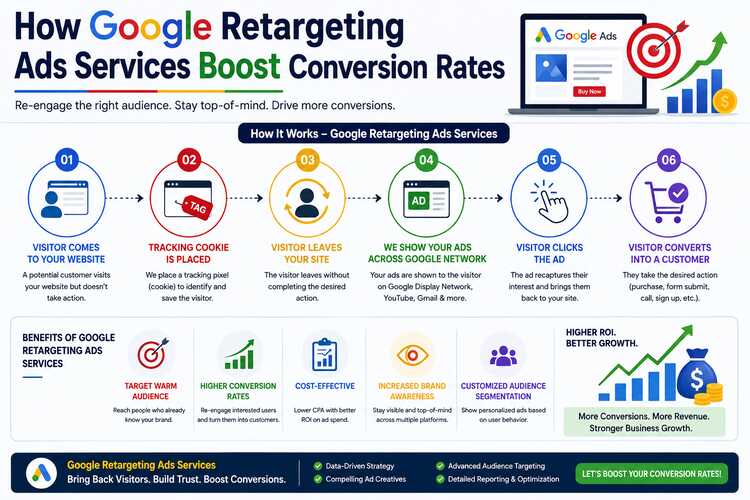
Imagine a customer visits your website, spends five minutes browsing your products, checks the price of one item, adds it to the cart and then leaves without buying. For many businesses, that feels like a lost customer. But what if that customer could be reminded about your product later while browsing another website, watching YouTube, searching on Google, or continuing their online journey? That is where Google retargeting ads services can make a significant difference.
Retargeting, also commonly referred to by Google as using your data segments, allows businesses to reconnect with people who have already interacted with their website, app, products, or brand. Instead of spending the entire advertising budget trying to reach completely new audiences, businesses can bring back people who have already shown interest.
This is particularly valuable because the customer already knows something about your business. They may have visited a product page, read a blog, compared prices, started filling out a form, or added a product to their shopping cart.
The goal is simple: turn previous interest into an actual conversion. In this guide, we will explore how Google retargeting ads services work, their key features and benefits, real-world examples, common strategies, and why retargeting can become an important part of a conversion-focused digital marketing strategy.
What Are Google Retargeting Ads?
Google retargeting ads are advertisements shown to people who have previously interacted with your business online. For example, suppose someone searches for “best running shoes,” visits your ecommerce website, looks at three pairs of shoes, but doesn’t purchase anything.
Later, while browsing another website or using a Google platform, they may see an advertisement related to your running shoes. That is retargeting. Google allows advertisers to create audience segments based on interactions with their business. These can include website visitors, app users, customers, and people who completed or did not complete particular actions. (Google for Developers)
The important point is that retargeting isn’t simply about showing the same advertisement repeatedly. A well-managed retargeting campaign uses audience segmentation, relevant messaging, conversion tracking, creative testing, bidding strategies, and timing to encourage users to take the next step.
How Google Retargeting Works
The process is relatively straightforward.
Step 1: A user visits your website
A potential customer arrives through Google Search, social media, organic search, referral traffic, email, or another marketing channel. They browse your website but don’t convert.
Step 2: The visitor enters an audience segment
With the appropriate Google tagging and audience setup, eligible visitors can be included in a remarketing or first-party audience. Google supports audiences based on website visits and specific actions.
Step 3: The user leaves your website
They may leave because they are comparing prices, checking competitors, getting distracted, waiting for payday, discussing the purchase with someone else, or simply not being ready to buy. Leaving the website doesn’t necessarily mean they aren’t interested.
Step 4: The user sees a relevant advertisement
Depending on the campaign setup, the user may later encounter your advertising across eligible Google advertising environments. For ecommerce businesses, dynamic remarketing can even show products that visitors previously viewed. Google describes dynamic remarketing as a way to show previous visitors ads containing products or services they viewed on a website or app.
Step 5: The visitor returns
The advertisement gives the customer another opportunity to return to your website. If the landing page, offer, product and checkout experience are strong, the returning visitor may finally convert.
Why Retargeting Can Improve Conversion Rates
One of the biggest advantages of retargeting is familiarity. A cold prospect may have never heard of your company. A retargeted visitor has already interacted with you. That difference matters. Consider two advertising messages:
Message A:
“Discover our premium accounting software.”
Message B:
“Still comparing accounting software? See how our automated invoicing can save your team time.”
The second message can feel more relevant because it speaks to someone who has already shown interest. Retargeting helps businesses continue the conversation rather than starting from zero every time. Google also provides conversion measurement tools that allow advertisers to track actions such as purchases, sign-ups, add-to-carts, quote requests, phone calls and other valuable actions. That data makes it possible to identify which audiences, advertisements and campaigns are actually producing business results.
Key Features of Google Retargeting Ads Services
A professional Google retargeting ads service typically combines several features rather than simply launching one campaign.
Website Visitor Retargeting
Website visitor retargeting is the foundation of many campaigns. You can create audiences based on people who have visited your website and reconnect with them later.
For example:
- All website visitors
- Product page visitors
- Service page visitors
- Blog readers
- Pricing page visitors
- Contact page visitors
- Cart abandoners
- Previous customers
Different audiences can receive different advertisements. That makes the campaign more relevant.
Dynamic Remarketing
Dynamic remarketing is particularly useful for ecommerce stores with multiple products. Instead of showing every visitor the same generic advertisement, dynamic campaigns can use product or service information from a feed and tailor advertisements around what the visitor viewed. (Google Support)
Example
A customer visits an online furniture store and views a:
₹35,000 office chair.
They leave without purchasing. Later, they see an advertisement featuring that same chair or relevant products. This creates a much stronger connection than showing a random furniture advertisement.
Audience Segmentation
Not every website visitor has the same level of buying intent. Someone who visited your homepage for 10 seconds shouldn’t necessarily receive the same advertisement as someone who spent 20 minutes comparing products.
Audience segmentation allows businesses to create groups based on user interactions and other available signals. Google supports audience segments based on interests, intent, demographics and interactions with a business.
For example:
| Audience | Possible Strategy |
| Homepage visitors | Brand reminder |
| Product viewers | Product-focused ad |
| Pricing visitors | Offer or value proposition |
| Cart abandoners | Purchase reminder |
| Previous customers | Cross-sell |
| High-value leads | Strong conversion message |
This makes advertising more personalized and strategic.
Search Retargeting
Retargeting isn’t limited to banner advertisements. Businesses can also use audience data with Google Search campaigns. Imagine someone previously visited your website while researching industrial solar inverters.
A few days later, they search:
“100 kW solar inverter price.”
A well-structured campaign can use audience information alongside search intent to help tailor the advertising strategy. Google has long supported the use of audience information to connect returning users with relevant Search campaigns. This is powerful because the customer is showing intent again. They aren’t simply browsing. They are actively searching.
Customer Match and First-Party Data
Businesses can also use customer information they have permission to use, such as CRM data, to reconnect with existing customers and prospects. Google describes Customer Match as a way to use customer-provided information to reach relevant existing customers across supported Google advertising environments.
For example, an online education company might have a database of people who previously requested information about an MBA program. Instead of treating those people as completely new prospects, the company can build an appropriate audience strategy around existing customer information.
Conversion Tracking
Retargeting without measurement is basically guesswork. Conversion tracking helps businesses understand what happens after people interact with advertisements. Depending on the business, conversions can include:
- Purchases
- Lead submissions
- Phone calls
- Quote requests
- Sign-ups
- App downloads
- Add-to-cart actions
- Contact form submissions
Google says conversion tracking helps advertisers understand which ads drive valuable actions and optimize campaigns toward business goals. This is one of the most important features of professional retargeting management.
Enhanced Conversions and Measurement
Modern advertising measurement is becoming more complex because of privacy changes and limitations around cookies and tracking. Google offers tools such as enhanced conversions, tagging, offline conversion imports and Consent Mode as part of its measurement ecosystem. For businesses with longer sales cycles, offline conversion imports can be especially valuable. For example, a B2B company may receive a lead online but close the actual deal several weeks later through its sales team. Connecting CRM outcomes with advertising data can provide a better understanding of which campaigns are generating valuable customers not just leads.
Frequency and Audience Control
Retargeting needs balance. If customers see the same advertisement too many times, the campaign can become annoying rather than persuasive. A good retargeting strategy therefore considers:
- Audience size
- Membership duration
- Frequency
- Creative rotation
- Exclusions
- Customer status
- Conversion status
- Purchase cycle
Someone who has already purchased should generally not continue seeing advertisements asking them to purchase the exact same product. Instead, they may be better suited for:
- Accessories
- Upgrades
- Related products
- Maintenance services
- Repeat purchases
Major Benefits of Google Retargeting Ads Services
Reconnect With Interested Customers
One of the biggest benefits is the ability to reconnect with people who already know your business. The customer has already crossed the first barrier: awareness. Your job is to give them a compelling reason to come back.
Improve Conversion Opportunities
A customer may need several interactions with a brand before purchasing. Retargeting creates additional opportunities to bring that customer back. This is especially useful for products with longer decision-making processes.
For example:
A customer looking for a ₹2,000 pair of shoes may buy quickly. But someone purchasing a ₹2 lakh solar system may compare:
- Brand
- Warranty
- Price
- Technology
- Installation
- Service support
- Financing
- Reviews
Retargeting can help maintain visibility throughout that decision process.
Better Use of Advertising Budget
Instead of allocating the entire budget toward cold audiences, advertisers can dedicate part of their budget to people who have already interacted with the company. This can make the overall advertising strategy more efficient when the audience and campaign are well configured. However, retargeting is not automatically cheaper or more profitable. Performance depends on the business, audience size, creative quality, competition, landing page, offer and campaign setup.
Higher Relevance
Relevance is one of the strongest advantages. Someone who viewed a particular product is more likely to respond to an advertisement related to that product than to a completely unrelated message. Dynamic remarketing takes this concept further by tailoring advertisements to products or services visitors previously viewed. (Google Support)
Supports Different Stages of the Buying Journey
Retargeting can be designed around different customer stages.
Awareness
The customer knows your brand but isn’t ready to buy.
Ad message:
“Discover why businesses choose our platform.”
Consideration
The customer is comparing options.
Ad message:
“Compare features, pricing and support.”
Decision
The customer is close to purchasing.
Ad message:
“Get your free consultation today.”
Abandoned Cart
The customer almost purchased.
Ad message:
“Your selected products are still waiting.” Each stage requires a different message.
Real-World Examples of Retargeting
Example 1: Ecommerce Clothing Store
Suppose an online fashion store gets 50,000 monthly visitors. A customer visits the website and looks at three formal shirts. They don’t purchase. Instead of losing contact with that visitor, the business can create an audience for product viewers. The retargeting campaign could show:
“Still looking for the perfect formal shirt? Explore our latest collection.”
If dynamic remarketing is configured correctly, the advertisement can be tailored to products the visitor viewed. The visitor returns and completes the purchase. That’s the basic retargeting journey.
Example 2: Solar Inverter Company
Consider a B2B solar inverter manufacturer. A customer searches for:
“50 kW solar inverter manufacturer in India.”
They visit the manufacturer’s website, download a brochure and leave. This isn’t necessarily a failed lead. The customer may still be comparing:
- Pricing
- Warranty
- Efficiency
- MPPT specifications
- Service network
- Certifications
- Delivery timelines
A retargeting campaign could show advertisements such as:
“Looking for reliable commercial solar inverters? Download our technical brochure.”
Another advertisement could say:
“50 kW–150 kW Solar Inverters | Technical Support | Request a Quote.”
The objective isn’t simply to make the customer click.
The objective is to keep the company visible while the buying decision is being made.
Example 3: Online Education Business
Suppose a student visits an MBA program page. They check:
- Course duration
- Fees
- Eligibility
- Subjects
- Admission process
Then they leave. The education company can create a suitable audience and show an advertisement later:
“Still planning your MBA? Check eligibility and admission options.”
The student returns, fills out the enquiry form and becomes a qualified lead. This is particularly useful for education because students often take days or weeks to make decisions.
Example 4: B2B Software Company
A SaaS company receives a visitor who views its pricing page but doesn’t sign up. This visitor has a stronger signal than someone who only read a blog post. The company can create a pricing-page audience and use a different advertisement:
“See how our platform can reduce manual reporting and save your team hours every week.”
The message addresses the customer’s potential problem rather than simply saying:
“Visit our website.”
That’s the difference between basic retargeting and strategic retargeting.
How Retargeting Services Improve Conversion Rates
There isn’t one universal conversion-rate benchmark that applies to every Google Ads campaign. Google itself notes that conversion rates vary depending on the product, market, conversion definition and advertising strategy. Instead of promising a specific percentage increase, professional retargeting services focus on improving the factors that influence conversions.
Better Audience Quality
Target people who have already demonstrated interest.
Better Messaging
Show advertisements that match the customer’s stage in the buying journey.
Better Timing
Reach customers when they are more likely to reconsider the purchase.
Better Landing Pages
Send users to pages directly related to the advertisement.
Better Measurement
Track actual conversions rather than focusing only on clicks.
Better Optimization
Analyze performance and adjust audiences, creative, bids and budgets. Google provides audience-level reporting and allows advertisers to evaluate metrics such as conversions and cost per conversion for audience segments.
Google Retargeting vs Traditional Advertising
Traditional advertising often works like this:
Show advertisement → hope customer remembers → wait.
Retargeting is more connected to actual customer behaviour:
Customer visits → customer shows interest → customer leaves → business reconnects → customer returns → conversion.
This doesn’t mean traditional advertising is ineffective. In fact, the two strategies can work together. A strong marketing funnel might look like:
Google Search Ads → Website → Remarketing → Email/CRM → Retargeting → Conversion
Each stage supports the next.
Best Practices for Google Retargeting Campaigns
Segment Your Audiences
Don’t put every visitor into one giant audience. Separate users based on meaningful actions. For example:
- Homepage visitors
- Product visitors
- Pricing visitors
- Cart abandoners
- Lead-form visitors
- Existing customers
Exclude Converted Customers
If someone has already purchased a product, don’t waste advertising budget repeatedly showing them the same acquisition advertisement. Instead, move them into an appropriate customer or upsell strategy.
Use Multiple Creatives
Don’t rely on one banner or one headline. Test:
- Different headlines
- Different offers
- Different images
- Different CTAs
- Different benefits
- Different product messages
Match Ads With Landing Pages
If your advertisement says:
“50 kW Solar Inverter , Request a Quote”
don’t send users to a generic homepage. Send them to a relevant 50 kW product or enquiry page. The more closely the advertisement matches the landing page, the easier it is for the visitor to continue the journey.
Use Clear Calls to Action
Examples include:
- Buy Now
- Get a Quote
- Book a Demo
- Download Brochure
- Start Free Trial
- Request Pricing
- Contact Sales
- Schedule Consultation
The CTA should match the customer’s level of intent.
Common Google Retargeting Mistakes
Mistake 1: Showing the Same Ad to Everyone
A first-time visitor and a cart abandoner are completely different audiences. Treating them the same wastes opportunities.
Mistake 2: Ignoring Frequency
Showing the same advertisement too frequently can create ad fatigue.
Mistake 3: No Conversion Tracking
Without reliable conversion measurement, you cannot confidently identify which campaigns are producing valuable outcomes.
Mistake 4: Sending Everyone to the Homepage
The homepage is rarely the best destination for a highly specific retargeting advertisement.
Mistake 5: Retargeting Existing Customers With Acquisition Ads
Customers who already purchased should be considered for retention, cross-selling or upselling strategies.
Mistake 6: Measuring Only Clicks
Clicks are useful, but businesses ultimately need outcomes. A campaign with fewer clicks can sometimes produce more revenue if those clicks are more valuable.
What Does a Google Retargeting Ads Service Include?
A professional service may include:
Strategy
- Business and competitor research
- Customer journey mapping
- Audience planning
- Campaign objectives
Tracking
- Google tag setup
- Google Tag Manager implementation
- Conversion tracking
- Analytics integration
- Enhanced conversion setup where appropriate
Audience Management
- Website visitor audiences
- Product viewers
- Cart abandoners
- Lead audiences
- Existing customers
- Custom audience combinations
Campaign Management
- Display retargeting
- Search audience strategies
- Dynamic remarketing
- YouTube or video remarketing where appropriate
- Customer Match strategies where eligible
Creative
- Display banners
- Responsive ad assets
- Product-focused advertisements
- Promotional messaging
- CTA testing
Optimization
- Budget adjustments
- Audience analysis
- Creative testing
- Landing page recommendations
- Conversion analysis
- Cost-per-conversion monitoring
How to Measure Retargeting Success
Businesses should look beyond impressions and clicks. Important metrics include:
Conversion Rate
The percentage of ad interactions that result in conversions.
Cost Per Conversion
How much advertising spend is required to generate a conversion.
Return on Ad Spend
Revenue generated compared with advertising expenditure.
Conversion Value
The monetary value associated with conversions.
Assisted Conversions
Useful for understanding how advertising contributes to a longer customer journey.
Customer Acquisition Cost
Important for understanding overall business economics. The right metrics depend on the business model. For ecommerce, revenue and purchases may be the primary metrics. For B2B, qualified leads, opportunities and closed sales may matter more. For SaaS, free trials, paid subscriptions and customer lifetime value can be more important.
Why Professional Retargeting Management Matters
Setting up a retargeting campaign may appear simple. But getting consistent business results requires much more. A professional Google retargeting ads service can help businesses connect:
Audience → Message → Advertisement → Landing Page → Conversion → Revenue
Each component affects the next.
If the audience is wrong, the advertisement won’t perform. If the advertisement is good but the landing page is poor, conversions may still be low. If the campaign generates leads but sales teams don’t follow up, advertising performance may appear weak. If conversion tracking is incorrect, optimization decisions can be based on unreliable data. This is why successful retargeting should be treated as part of the complete marketing and sales funnel rather than as an isolated advertising activity.
The Future of Retargeting: First-Party Data and Smarter Measurement
Digital advertising continues to change. Privacy expectations, browser restrictions and changes in tracking technology mean businesses need to pay greater attention to first-party data and responsible measurement.
Google’s current advertising ecosystem includes tools such as first-party audience segments, Customer Match, enhanced conversions and offline conversion measurement. This means the future of retargeting is not simply:
“Show the same ad again.”
It is increasingly about understanding customer signals and delivering relevant messages while respecting privacy and advertising policies. Businesses that build strong first-party data strategies, accurate measurement and useful customer experiences will be better positioned to make their advertising budgets work harder.
Final Thoughts
Google retargeting ads services can be a powerful way to convert existing interest into measurable business results. The biggest advantage is simple: you’re not talking to a complete stranger.
The customer has already visited your website, viewed a product, explored a service, searched for information, downloaded content or interacted with your business in some way. Retargeting gives you another opportunity to continue that conversation. But effective retargeting is not about following customers around the internet with the same advertisement.
It is about understanding who the customer is, what they previously did, what they may need next, and what message can encourage them to take action.
When combined with accurate conversion tracking, audience segmentation, dynamic creative, relevant landing pages, strong offers and continuous optimization, retargeting can become an important part of a performance-driven advertising strategy.
For ecommerce brands, it can help recover abandoned shopping journeys. For B2B companies, it can help maintain visibility during longer buying cycles. For education providers, it can bring interested students back. For SaaS companies, it can re-engage trial and pricing-page visitors. For service businesses, it can turn previous website visitors into enquiries. Ultimately, the objective isn’t simply to get another click.
The real objective is to bring the right customer back at the right moment with the right message and turn that renewed interest into a conversion.
That is where Google retargeting ads services can create real value for modern businesses.
Ready to improve your conversion strategy? Start by auditing your existing website audiences, conversion tracking, customer journey and advertising creatives. Once you understand where potential customers are dropping out, retargeting can be used strategically to bring high-intent visitors back and give them a stronger reason to convert.
Tips on Google Retargeting Ads Services
If you run google ads, you already know that most people do not convert the first time they visit your site. That is where a remarketing campaign becomes valuable. It helps you reconnect with people who showed interest, then left before buying, booking, or signing up. Instead of starting over with cold traffic, you can speak to warmer audiences who already know your offer. In many cases, that simple shift can lift your conversion rate and make your ad spend work harder.
Understanding Google Retargeting Ads Services
Google retargeting is a way to show remarketing ads to people who have already interacted with your website, app, or content. These users are not strangers. They are potential customers who have already shown some level of interest in your brand, product, or service.
Because of that, your target audience is warmer and often easier to move through the sales funnel. Instead of using one broad message for everyone, you can reach people based on what they viewed or did. That is what makes Google retargeting more relevant and more conversion-focused.
What Are Retargeting Ads and How Do They Work?
A retargeting ad is an ad shown to people who previously visited your site or interacted with your business. In google ads, this usually starts with a tag or tracking setup that records those visits and actions. Once enough users are collected, you can serve ads to them later across Google properties and partner sites.
The system works by grouping past visitors into audiences. You might build lists for pricing page visitors, cart abandoners, or repeat site visitors. That gives you a way to show personalized ads based on where people stopped in their journey.
There are several types of remarketing, including standard remarketing, dynamic remarketing, search-based remarketing, and video-based options. The main goal is simple: bring target users back and help them continue from where they left off.
Difference Between Retargeting and Remarketing in Google Ads
In practice, many marketers use remarketing and retargeting as the same idea inside google ads remarketing. Both focus on reconnecting with people who already engaged with your business. That is why the terms are often swapped in digital marketing conversations.
Still, there is a common distinction. Remarketing often refers to direct follow-up through owned channels, such as email, usually aimed at users who already shared contact details or converted. Retargeting platforms, on the other hand, usually describe paid ads shown on third-party websites or networks.
So, the basics of remarketing in Google often overlap with a retargeting campaign. The real difference is usually the channel. In this blog, the focus is on Google’s ad-based approach, where past visitors see relevant ads after leaving your site.
How to Set Up Retargeting Ads on Google?
Start in your google ads account by opening Tools, then Audience Manager, then Your Data Segments. If you have not done this before, Google will ask you to choose an audience source. The simplest option is the google ads tag. For standard remarketing, choose general website visit data. If you want more advanced tracking, you can select specific actions users take on your site.
After that, install the tag on your website directly or through Tag Manager. Once it starts collecting data, your site visitors will begin filling your remarketing lists. From there, create audiences based on pages visited or actions completed, then add those lists to a new campaign. Keep your remarketing goals clear so your audience setup, messaging, and campaign type all support the same outcome.
Google Shopping Remarketing
For e-commerce brands, google shopping remarketing can be one of the most practical ways to win back interested buyers. If someone viewed a product but left without purchasing, dynamic remarketing can show that same item again later. This creates a more relevant experience than a generic ad because the message reflects what the shopper already considered.
To make this work, your product feed needs to be connected and your tagging must capture product activity such as views, cart actions, and purchases. Google can then pull details from the feed and build shopping ads automatically. Since users are reminded of specific products they already browsed, this approach often supports a stronger conversion rate than broader prospecting alone.
Why Choose Google Retargeting Ads for Conversion Rate Optimization
Google retargeting focuses your budget on people who already know your business. That matters because warm audiences usually need less convincing than cold traffic. They have visited your pages, seen your offers, or started the buying process.
As a result, a retargeting campaign often supports a better conversion rate than broad targeting. Google ads retargeting also lets you tailor messaging by behavior, which makes each ad feel more relevant. The next sections explain why this often gives Google an edge over other options.
Key Benefits Over Other Advertising Platforms
Not every platform gives you the same range of remarketing options. Google stands out because it can reconnect with users across search, shopping, display, and video. That broad reach makes it easier to stay visible at different moments in the buying journey.
Compared with many retargeting platforms, Google can be especially efficient when audiences are well segmented. Because these users already showed intent, campaigns often generate lower cost clicks and stronger response rates than broader awareness campaigns.
Key benefits include:
- Reach across multiple placements, not just one channel like Facebook advertising.
- Better conversion rates from users who already know your offer.
- Stronger brand awareness and brand recall through repeated exposure.
- More control over message relevance by audience behaviour and intent.
How Google Retargeting Helps Recover Lost Leads and Customers
Yes, Google retargeting can help recover lost leads and customers. Many people leave a site without taking a specific action, even when they are interested. They may get distracted, compare options, or simply need another reminder before deciding.
That is where a remarketing campaign becomes useful. Once the remarketing tag records their visit, you can re-engage them with ads tied to what they viewed. A person who visited a service page may see a message about booking a strategy call. Someone who visited pricing may respond to a limited-time offer.
These remarketing efforts can recover drop-offs by:
- reminding users where they left off,
- matching ads to past behaviour,
- keeping your brand visible until they are ready to return.
Key Highlights
- Google retargeting helps you reconnect with website visitors who left before taking a specific action.
- A remarketing campaign can improve brand awareness, brand recall, and conversion rate with lower cost traffic.
- You can reach target users across the display network, Google Search, Shopping ads, and YouTube video ads.
- Smart audience segments and remarketing lists make personalized ads far more relevant.
- Dynamic remarketing is especially useful for e-commerce brands using a product feed.
- Strong setup, testing, exclusions, and frequency capping help protect budget and improve results.
Types of Audiences Targeted by Google Retargeting Ads
The strength of retargeting comes from audience segments. Instead of treating every visitor the same way, you can build remarketing lists based on pages viewed, actions completed, or how often someone visited your site. That helps you define a much sharper target audience.
You can also use demographic data and first-party signals to refine your approach. The goal is not to target more people. It is to target the right people with a message that fits their stage. Let’s look at two useful audience types next.
Website Visitors and Abandoned Carts
One of the most common audiences includes general website visitors. These are users who landed on your site but left before converting. You can build lists for broad traffic or narrow them to people who reached a key page, such as a service page or pricing page.
Abandoned carts are even more valuable for e-commerce. These users came very close to buying, which often means higher intent. If your campaign type is set up properly, you can show ads that remind them about the exact product they considered.
Google analytics can help you see which pages and actions signal stronger intent. That allows you to create more useful audience groups, such as: people who viewed products, people who started checkout, or people who returned multiple times but still did not convert.
Custom Segments and Similar Audiences
Beyond standard lists, you can create custom segments in Audience Manager to reflect how people move through your business. That might include blog readers, form starters, users from a certain location, or visitors who viewed high-intent pages.
These setups help you build a more focused remarketing audience. Instead of one message for everyone, you can align the ad with the reason a person visited in the first place. That keeps the experience more relevant and can improve engagement.
Some advertisers also use similar audiences or related expansion methods when available, but the core value still comes from your own data. A strong target audience usually starts with clear on-site behaviour, not guesswork.
Where You Can Use Google Retargeting: Display, Search, and YouTube
Google retargeting is not limited to one placement. You can reach past visitors through the display network, search ads, shopping, and youtube. That makes it easier to reconnect with users in different contexts, whether they are browsing articles, searching again, or watching content.
The google display network is especially common for broad visibility, while search and video ads can support stronger intent-based follow-up. Each format plays a different role, and the next two sections explain how these options work.
Display Network Retargeting
Display network retargeting shows display ads to past visitors while they browse sites across Google’s partner inventory. This is one of the most recognized forms of remarketing because it keeps your message visible after someone leaves your website.
The value here is visibility. A user may not be ready to convert right away, but repeated exposure through google display can improve brand recall and keep your business top of mind. That matters when buyers need several touches before they act.
It also gives you room to match visuals and offers to user behaviour. A visitor who viewed a service page might see a benefits-focused banner, while a shopper may see a product reminder. Search and YouTube options expand this even further.
Search and YouTube Retargeting Options
Google also supports remarketing through google search and YouTube. On Search, this often appears as RLSA, where search ads are shown only to people already on your lists when they search for relevant terms again. On YouTube, video ads can reach users who visited your site or interacted with your channel.
These options are useful because they meet people in active environments. Search users are showing intent. Video viewers are often in discovery mode but still easy to re-engage with strong creative.
You can use these formats to:
- tailor search ads for past visitors,
- run YouTube video ads to warm audiences,
- match each retargeting ad to the user’s last interaction.
Beginner’s Guide to Setting Up Google Retargeting Ads
If this is your first time building a retargeting setup, keep it simple. The basics of remarketing start with tracking, audience creation, and campaign targeting. You do not need a complex structure on day one. You need clean data and a clear goal.
Your google ads account gives you the tools to do that through Audience Manager and Tag Manager. Once the foundation is in place, you can create more advanced audiences and ads. First, make sure you have the right pieces ready.
What You’ll Need to Get Started (Google Ads Account, Tag Manager, Tracking Pixel)
You only need a few essentials to start. The first is a google ads account, since that is where you create audiences and launch campaigns. The second is Tag Manager or another installation method so your tracking setup can go live across the site.
You also need a tracking pixel or remarketing tag. In Google’s setup, this may be the Google Ads tag or a linked google analytics configuration with advertising features enabled. Both help collect visitor behaviour for future audience building.
Your starter checklist should include:
- an active google ads account,
- tag manager access,
- a live remarketing tag or tracking pixel,
- optional google analytics integration for deeper audience control.
Common Mistakes Beginners Should Avoid
Many beginners assume any past visitor should see the same retargeting ad. That usually weakens performance. A person who read a blog post is not at the same stage as someone who reached checkout or the pricing page.
Another common issue is weak setup. If your remarketing lists are too broad, too small, or missing exclusions, your campaign can waste budget. The same problem happens when ad copy does not match the user’s last action or landing page.
Avoid these early mistakes:
- using one message for every audience,
- forgetting to exclude recent converters,
- launching a remarketing campaign before your tracking is verified.
Step-by-Step Guide to Launching Your First Google Retargeting Campaign
Once your tracking and lists are ready, building a google ads retargeting campaign becomes much easier. The first step is not writing ads. It is making sure your tag is installed correctly and your audience can actually populate.
After that, you can move from setup to launch with a clear sequence: tag, audiences, campaign build, creatives, and optimization. The next steps walk through that process in a practical order.
Step 1: Set Up and Install the Google Ads Remarketing Tag
Open Audience Manager in Google Ads and choose your audience source. If you want a simple starting point, select the google ads tag. Google recommends this for standard remarketing because it is straightforward and works well for many businesses.
Next, choose the type of data you want to collect. Standard setups gather general website visits, while advanced options can track more specific actions. Once you save the setup, install the remarketing tag on your website using the method Google provides.
After installation, the tag begins collecting visitor data. Over time, that data helps build audience segments based on site behaviour. You can later target users who visited a landing page, viewed key services, or moved closer to purchase.
Step 2: Create and Segment Your Audiences
With tracking live, go back to Audience Manager and create your remarketing lists. Think about what behaviour matters most to your business. Not every visitor has the same intent, so your lists should reflect different stages in the journey.
This is where custom segments become useful. You can separate casual readers from people who visited important pages or completed high-value actions. Better segmentation makes your target audience more precise and helps your messaging stay relevant.
Useful lists often include:
- pricing or service page visitors,
- cart or checkout abandoners,
- repeat visitors or form starters.
Step 3: Build Your Retargeting Campaign in Google Ads
Now create a new campaign in google ads. Choose your objective, then select the campaign type that fits your strategy, such as Display, Search, Shopping, or Video. Add your budget and bidding settings before moving to targeting.
In the audience section, browse to users who interacted with your business and select the remarketing list you built earlier. This step connects the campaign to past visitors instead of cold traffic. That is what turns a standard setup into a retargeting ad campaign.
Finally, add ad copy and URLs that match the audience’s past behaviour. Someone who left after viewing pricing should not get the same message as a casual blog reader. Strong alignment between audience and message is what improves results.
Step 4: Design and Upload Effective Retargeting Ad Creatives
Creative matters because returning visitors already know something about you. Your ad copy should remind them why they clicked before and why they should come back now. Keep the message tied to their last action, not a generic brand line.
For display ads, use visuals and calls to action that reflect the offer or page they viewed. If a shopper abandoned a product, show that item again when possible. If a lead visited a service page, focus on the next step and the value of returning.
Dynamic remarketing is especially effective here because it can automate personalized ads using product-level data. That makes the experience feel timely and relevant without requiring a separate creative for every item.
Step 5: Launch, Monitor, and Refine Your Campaign
Once your ads are approved, launch the campaign and start watching early performance. Do not judge results too quickly. Give the system time to gather data, especially if your audiences are still building and volume is modest.
As you monitor results, focus on whether the campaign supports your remarketing goals. Look at user behavior, return visits, and whether the audience is moving toward conversion. If one list or message underperforms, adjust it instead of changing everything at once.
You can also improve performance through linked analytics and advertising features. The goal is not only to get impressions. It is to raise conversion rate by learning which audience, message, and placement combination works best.
Tag Manager
If you want a cleaner setup, Tag Manager is often the easiest route. In Google Ads, go to Audience Manager, choose tag setup, and select the option to install through Tag Manager. Google will provide the information needed for the tag.
Inside tag manager, create a new Google Ads remarketing tag and enter the conversion ID from your account. Set the trigger to fire on all pages unless you need a more advanced setup. Publish the container so the tracking pixel becomes active on your site.
You can also connect google analytics for extra audience control, but the main point is simple: Tag Manager helps you install the google remarketing tag without editing site code on every page. It is a practical option for beginners and growing teams.
Selecting Your Audiences
Selecting the right target audience is one of the biggest factors in remarketing success. If your lists are too broad, your message becomes vague. If they are too narrow, you may not reach enough people to run effectively. The best approach is to group people by intent and stage, not by convenience. That is why audience segments matter so much.
Start with remarketing lists tied to meaningful behaviour. Think pricing page visits, cart abandonment, repeat visits, or users who filled out part of a form. These groups tell you more about intent than raw traffic volume does. Once you identify your strongest target users, you can match offers, bids, and creatives more accurately.
Best Practices for Maximizing Results with Google Retargeting
A strong retargeting ad campaign is not just about following people around the web. It is about using google ads in a way that feels relevant, timely, and controlled. That means better segmentation, better offers, and better exclusions.
Your broader marketing strategy should support that with personalized ads, testing, and clear goals. The next sections focus on practical ways to improve performance without making campaigns overly complex.
Ad Frequency, Creative Rotation, and Exclusion Strategies
Retargeting works best when people remember your brand without feeling chased by it. That is why ad frequency matters. If the same person sees the same message too often, performance usually drops and your brand can feel intrusive.
Creative rotation helps prevent that. Instead of showing one version forever, rotate different display ads, offers, or visuals. Pair this with the right campaign type so your placements and message match user intent and stage.
Practical habits include:
- limiting ad frequency to reduce fatigue,
- using creative rotation to keep ads fresh,
- applying exclusion strategies for recent buyers,
- separating audiences by funnel stage and campaign type.
Measuring Success: Key Performance Metrics to Track
To measure a remarketing campaign properly, focus on actions that show progress, not just impressions. A high volume of views may support awareness, but return visits, conversions, and efficiency tell you more about actual business impact.
Google analytics can help you compare audience behaviour after the campaign launches. Look at which lists return, which pages they visit, and whether the ad copy matches stronger on-site outcomes. These signals show whether your campaign is truly moving users forward.
| Metric | What it tells you |
| Conversion rate | How many returning users complete the desired action |
| Return visits | Whether remarketing is bringing people back to the site |
| Audience performance | Which remarketing list drives the strongest results |
| Ad engagement | Whether your ad copy and creative are relevant |
| Cost efficiency | Whether results are coming in at a sustainable lower cost |
Bid testing
Not all remarketing audiences deserve the same bid. Someone who read a blog post is usually less valuable than a user who visited pricing or started checkout. Bid testing helps you reflect that difference inside google ads.
A smart approach is to test bids by intent level and campaign type. Higher-intent audiences may justify stronger bids because they are closer to converting. Lower-intent users can still be worth reaching, but usually at a lower cost and with less aggressive spend.
Keep the process simple. Test one major adjustment at a time and compare audience performance before making larger changes. The goal of bid testing is not to spend more. It is to allocate budget where conversion potential is strongest.
Audience testing
Audience testing helps you find out which groups are actually worth scaling. You may assume one remarketing audience will perform best, but the data often tells a different story. A repeat visitor segment may outperform a broader site visitor list. A pricing page audience may beat a product viewer list.
Use Audience Manager to create separate groups and compare them without blending signals. Keep the creatives and landing pages aligned so you can judge the audience fairly. Small differences in intent can create much better conversion rates.
This is why audience testing is so useful. It turns remarketing from a broad reminder tactic into a focused system that prioritizes the audiences most likely to return and convert.
Frequency Capping
Frequency capping lets you control how often a person sees your ads in a remarketing campaign. In google ads, this is available for Display and Video campaigns, where repeated impressions can quickly become too much if left unchecked. Google may default to an optimized setting, but manual review is still important if you want more control.
Used well, frequency capping protects both budget and brand perception. Too much ad frequency can create fatigue, wasted spend, and irritation. A cap helps you stay visible without overwhelming people. It is especially useful when your audience is small or when the buying cycle is longer and users need reminders over time rather than constant repetition.
How To Optimize Remarketing Campaigns
To optimize a remarketing campaign, start with the basics: segment audiences properly, align ads with past behavior, and keep testing. In google ads, small improvements in targeting, exclusions, or creative can make a big difference because the traffic is already warm. You do not need more complexity. You need tighter control over relevance.
It also helps to review your remarketing goals often. Are you trying to recover abandoned carts, increase return visits, or push high-intent leads toward a decision? Once that is clear, optimize around it. Use exclusions for recent purchasers, refine bids by intent, monitor placement quality, and keep messages consistent with the user’s last interaction. That is where better results usually come from.
Conclusion
In conclusion, Google retargeting ads services are a powerful tool for enhancing your conversion rates by reconnecting with potential customers who have previously engaged with your brand. By understanding how to effectively set up and optimize your retargeting campaigns, you can ensure that your messages reach the right audiences across various platforms, whether it be display networks, search results, or YouTube. Embracing best practices such as creative rotation, audience segmentation, and continuous monitoring will help you maximize your results.
As you take the next steps in your advertising journey, remember that leveraging retargeting strategies can not only recover lost leads but also build lasting relationships with your customers. If you’re ready to boost your conversion rates, get a free trial of our Google retargeting services today!
Frequently Asked Questions
How Much Do Google Retargeting Ads Services Typically Cost?
Costs vary, but a google ads retargeting ad often runs at a lower cost than broader prospecting because the audience is smaller and warmer. Your remarketing campaign spend depends on bidding, competition, audience size, and setup quality. High-intent users, such as pricing page visitors, may justify stronger bids.
Can I Use Google Retargeting for Both Small and Large Businesses?
Yes. Google retargeting works for both small and large businesses because it focuses on reconnecting with potential customers who already showed interest. In google ads, remarketing ads can support brand awareness for growing companies and help larger brands scale follow-up across multiple audience groups.
How Do I Know If My Retargeting Campaign Is Working?
Use google analytics and google ads to review return visits, audience behaviour, and conversion rate. If your remarketing campaign is working, you should see stronger performance from warm audiences over time. Good ad copy should also align with higher engagement and more users completing the desired action.
Is Google Retargeting Effective for E-commerce and Service-based Businesses?
Yes. Google retargeting is effective for e-commerce and service-based businesses because both can use a remarketing tag to reconnect with interested visitors. E-commerce brands often benefit from display ads and dynamic product reminders, while service-based businesses can re-engage users who visited key pages but did not inquire.